How to Optimise Your Wix Site for SEO

Updated: Oct 3
Wix makes it possible to build a professional website without extensive coding knowledge, but creating a website is only the first step. To attract organic traffic, your pages need to be discoverable, relevant to what people search for, easy to navigate and useful to visitors.
Understanding how to optimise your Wix site for SEO can help you improve search visibility, attract relevant visitors and create more opportunities for enquiries or sales. Whether you run a small business, publish a blog or manage an online store, the fundamentals remain similar: use relevant keywords, structure your content properly, configure technical settings and monitor performance over time.

Wix provides built-in SEO features, including an SEO Setup Checklist, editable title tags and meta descriptions, URL controls, structured data options and sitemap generation. However, these tools do not automatically guarantee higher rankings. Your results also depend on content quality, competition, website usability and how effectively your pages meet search intent. (Wix SEO Help Center)
This guide explains the essential Wix SEO best practices you can implement without needing advanced technical skills.
1. Set Up Wix SEO Settings Correctly
Start by configuring your website's SEO foundation before spending time on individual pages.
Sign in to your Wix dashboard and open the SEO & GEO section. Look for the SEO Setup Checklist and follow the steps relevant to your website. Wix uses information about your business, website and target keywords to provide a personalised setup process.
You can also connect your website to Google Search Console to monitor how it appears in Google Search.
Check that your business name, website domain and primary keywords accurately describe what you offer. If you operate a physical business, add the relevant location information.
Next, confirm that search engines are allowed to index your website. In Wix, open SEO & GEO, navigate to SEO Settings and check that the option to let search engines index your site is enabled. Individual pages can have their own indexing settings, so check those separately if a page does not appear in search results. (Wix indexing guide)
Remember that publishing a website does not guarantee immediate indexing. Search engines need time to discover, crawl and evaluate your pages.

2. Conduct Keyword Research Before Optimising Pages
Keyword research helps you understand what your potential customers search for and how they describe their needs.
Start by identifying the main services, products or topics your website covers. Then expand each topic into specific search phrases.
For example, a digital marketing agency might target:
Digital marketing services for small businesses
SEO services for ecommerce websites
How to improve website rankings
Wix SEO optimisation services
These phrases represent different search intentions. Someone looking for a service may be closer to making a purchase, while someone asking how SEO works may be researching a problem.
Your website should address both where relevant.
Use Google Search Console to discover queries already generating impressions for your website. Keyword research tools can help you explore related searches, competition and potential content opportunities.
Assign a primary search topic to each important page. This reduces unnecessary overlap between pages targeting similar terms and helps you develop a clearer website structure.
Avoid inserting every keyword into every page. Natural wording, relevant information and clear answers are more useful than repetitive phrases.

3. Optimise Title Tags and Meta Descriptions
Title tags and meta descriptions help communicate what a page contains before someone visits it.
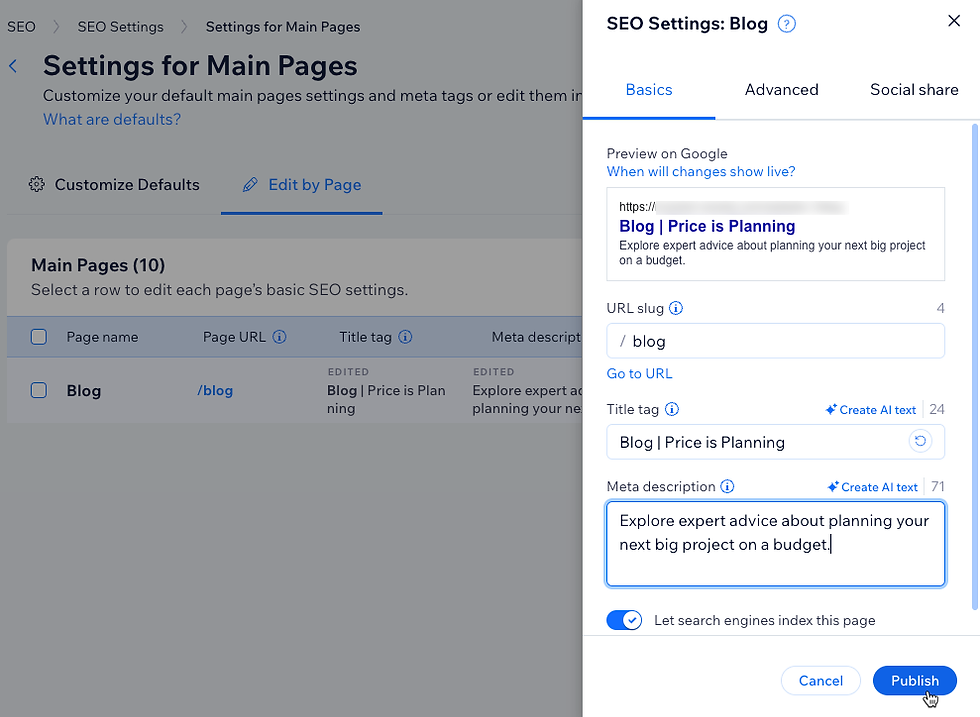
Wix lets you edit these elements through the SEO settings for individual pages. You can also configure default settings for groups of pages, such as blog posts or products, and customise important pages separately. (Wix SEO settings)
Writing effective title tags
A good title tag should describe the page accurately, include the primary topic naturally and give users a clear reason to click.
For example:
SEO title: How to Optimise Your Wix Site for SEO
For a business offering professional services, a more specific title could be:
Wix SEO Services for Small Businesses | Brand Name
Keep titles clear and concise. Avoid repeating the same keyword several times or using identical titles across multiple pages.
Google may generate a different title link in search results using other page elements, so the title you enter is not always the exact wording users will see. (Google SEO Starter Guide)
Writing useful meta descriptions
A meta description should summarise the page and explain what readers can expect.
For this article, an appropriate description would be:
Learn how to optimise your Wix site for SEO with practical tips on keywords, metadata, content, technical SEO, indexing and performance tracking.
Write a unique description for each important page. Avoid generic text that could apply to every page on your website.
Google may use your meta description in search results, but it can also generate a snippet from the page content depending on the search query.
4. Structure Headings and On-Page Content Properly
Clear content structure helps visitors understand your page and makes it easier to navigate.
Use one descriptive H1 heading for the main topic, followed by H2 headings for major sections and H3 headings for relevant subsections.
For example, a page about Wix SEO could use:
H1: How to Optimise Your Wix Site for SEO
H2: Wix SEO Settings You Should Configure
H2: How to Improve Wix On-Page SEO
H3: Optimise Title Tags and Meta Descriptions
H3: Improve Internal Linking
In the Wix Editor, select the relevant text and assign the appropriate heading style or text theme. Check the published page to ensure the heading hierarchy remains logical.
Do not choose headings solely for their visual size. A heading should describe the content that follows it.
Your main content should answer the visitor's question directly, explain important details and provide useful examples. For service pages, describe what you offer, who it is for, how the process works and what the customer should do next.
For blog posts, organise the discussion around the reader's questions rather than adding headings simply to repeat keywords.

5. Create SEO-Friendly URLs
A URL should be understandable to both visitors and search engines.
For example:
Better: example.com/wix-seo-guide
Less descriptive: example.com/page-12345
In Wix, you can edit page URL slugs through the relevant page settings. Blog posts and product pages may have additional URL structure options under SEO Settings.
Use short, descriptive slugs that reflect the page topic. Separate words with hyphens and avoid unnecessary numbers or parameters.
Be careful when changing URLs on established pages. Existing links, bookmarks and search engine references may point to the old address.
If a URL must change, configure an appropriate permanent redirect using Wix's URL Redirect Manager. Wix provides redirect tools to help send visitors and search engines from old URLs to new destinations. (Wix SEO settings)
6. Improve Internal Linking and Website Structure
Internal links connect one page on your website to another.
They help visitors discover related information and allow search engines to find additional pages and understand their relationships.
For example, a blog about website optimisation could link to relevant pages covering SEO services, website design, content marketing or technical SEO.
Use descriptive anchor text that tells visitors what to expect when they click.
Instead of repeatedly using "click here", use phrases such as "explore our Wix SEO services" or "read our guide to keyword research".
Organise your website around clear categories. Important service pages should be accessible through your navigation or relevant supporting content.
Avoid creating isolated pages that receive no meaningful internal links. Review your website regularly to identify useful linking opportunities, especially when publishing new blog posts.
7. Optimise Images for Search and Website Performance
Images improve the visual experience, but large or poorly labelled files can create problems.
Before uploading an image, resize it to suit its intended display dimensions and use an appropriate file format. Modern formats such as WebP can reduce file sizes when used appropriately.
Give files descriptive names where practical. For example, wix-seo-audit-dashboard.webp communicates more than IMG_1048.webp.
Add meaningful alternative text to informative images. Alt text should describe the image's purpose or relevant content rather than repeat a list of keywords.
For a screenshot showing Wix SEO settings, suitable alt text might be:
"Wix SEO settings dashboard showing page metadata options."
Decorative images that provide no additional information should not receive keyword-heavy descriptions.
Wix provides image optimisation features, but you should still review image dimensions, file sizes and how images appear on mobile devices.
8. Check Technical SEO, Indexing and XML Sitemaps
Technical SEO helps search engines access, understand and process your website.
Wix handles several technical tasks automatically, including generating XML sitemaps. Its sitemap updates as the website changes, helping search engines discover eligible URLs. (Wix guide to pages missing from search results)
However, automatic features do not remove the need for checks.
Start by confirming that the site and its important pages can be indexed. Then inspect the sitemap and check for accidental indexing restrictions.
You can use Google Search Console's URL Inspection tool to check how Google understands a specific page and whether it has been indexed. If a page is eligible but not indexed, investigate the reported issue rather than repeatedly submitting the URL without making improvements.
Check for broken links, unnecessary redirects, duplicate content and incorrect canonical settings. If you remove or replace a page, ensure that visitors are directed to a relevant destination where appropriate.
Wix also provides controls for structured data on supported page types. Structured data can help search engines interpret information about a page, but valid markup does not guarantee a special search result.
9. Improve Mobile Usability and Website Speed
Many visitors discover websites on mobile devices, so your pages should be easy to read and use on smaller screens.
Preview your Wix website on mobile and check that headings fit properly, text remains readable, buttons are easy to tap and forms are straightforward to complete.
Look for oversized images, unnecessary animations, intrusive pop-ups and sections that make important information difficult to find.
Website performance also matters to user experience. Review image sizes, limit unnecessary third-party apps and remove features that add little value.
Google's page experience guidance discusses several aspects of user experience, including Core Web Vitals, mobile usability considerations and secure browsing. Good performance alone does not guarantee high rankings, but it can support a better experience for visitors. (Google page experience guidance)
Use PageSpeed Insights to evaluate real-world performance data where available and identify potential improvements. Prioritise changes that improve loading, responsiveness and visual stability without compromising the website's usefulness.
10. Use Local SEO If You Serve a Specific Area
Local SEO is particularly relevant for businesses that serve customers in a particular city or region.
If your business has a physical location or serves customers locally, keep your business name, address and phone number accurate and consistent across important online profiles.
Create a Google Business Profile where eligible, choose relevant business categories and encourage genuine customer reviews.
Your Wix website should clearly describe the services you provide and the areas you serve. Location pages can be useful when they contain genuinely relevant information about each area rather than near-identical text created only to target city names.
For example, a website design agency serving Delhi could have a dedicated page explaining its services for businesses in Delhi, supported by relevant project examples or local information.
Do not create dozens of thin location pages if the business has no meaningful connection to those areas.

11. Track SEO Performance With Google Search Console and Analytics
SEO should be an ongoing process rather than a one-time setup.
Google Search Console helps you understand how your website performs in Google Search. Its Performance report includes clicks, impressions, click-through rate and average position, along with data about queries and pages. (Google Search Console Performance report)
Use this data to identify pages receiving impressions but few clicks. Their titles, descriptions or content may need improvement, although search intent and competition should also be considered.
Look for queries where your website appears but does not yet attract much traffic. These can reveal opportunities to improve existing pages or publish useful supporting content.
Google Analytics can help you understand what visitors do after arriving on your site, including engagement and important actions such as form submissions or purchases when properly configured.
Review performance monthly, compare similar time periods and focus on meaningful trends rather than reacting to every short-term fluctuation.
12. Common Wix SEO Mistakes to Avoid
Several mistakes can limit the effectiveness of Wix SEO optimisation.
One is assuming that completing the SEO Setup Checklist is enough. The checklist provides a useful starting point, but keyword research, content development, internal linking and ongoing monitoring remain necessary.
Another is using the same title tag and meta description across every page. Important pages should communicate their distinct purpose.
Keyword stuffing is also unhelpful. Repeating a phrase unnaturally does not make content more valuable.
Other common problems include leaving important pages blocked from indexing, uploading oversized images, creating confusing URLs, publishing thin content and ignoring mobile usability.
Some website owners also expect immediate ranking improvements after making changes. Search engines need time to recrawl and reassess pages, and rankings depend on many factors beyond a site's settings.
For more advanced projects, a Wix Expert with SEO experience can help with site architecture, bulk metadata, redirects, structured data, content planning and performance analysis.
Conclusion
Learning how to optimise your Wix site for SEO begins with a solid foundation: configure your Wix SEO settings, research relevant keywords, write clear metadata, organise headings, improve internal links and create useful content.
Next, review indexing, XML sitemaps, image optimisation, mobile usability and website performance. If you serve a local market, incorporate local SEO into your strategy. Finally, use Google Search Console and Google Analytics to measure progress and identify the next improvements.
Wix provides the tools needed to implement many essential SEO practices, but sustainable organic visibility requires consistent attention to relevance, usability and content quality.
A well-optimised website is not simply one that search engines can crawl. It is one that helps the right people find useful information, understand your offering and take the next step.
Frequently Asked Questions About Wix SEO
Is Wix good for SEO?
Wix provides built-in SEO tools for editing metadata, managing URLs, controlling indexing and generating sitemaps. Results still depend on content quality, technical configuration, competition and user experience.
How do I optimise my Wix site for SEO?
Start with Wix's SEO Setup Checklist, conduct keyword research, optimise title tags and meta descriptions, structure headings, improve internal links and image alt text, check indexing and monitor results through Google Search Console.
Does Wix automatically generate an XML sitemap?
Yes. Wix automatically generates a sitemap for your website and updates it as eligible pages change. You can use Google Search Console to monitor indexing and submit the sitemap if necessary.
How long does Wix SEO take to show results?
There is no fixed timeline. Search engines need time to discover and evaluate changes, and results depend on competition, website history, content quality and other factors. Monitor trends over time rather than expecting immediate ranking changes.
Can I do Wix SEO without coding?
Yes. Many essential tasks, including editing metadata, changing URL slugs, adding alt text and managing basic SEO settings, can be completed through Wix's interface. Advanced technical issues may require specialist support.
Is Wix SEO suitable for ecommerce websites?
Yes. Wix supports SEO settings for product pages and other relevant store content. Ecommerce businesses should also optimise product titles, descriptions, images, categories, internal links and customer-facing information.
What is the difference between Wix SEO and general SEO?
Wix SEO applies established SEO principles through Wix's platform-specific tools. General SEO principles include content relevance, keyword research, internal linking, crawlability, user experience and performance monitoring. The platform changes how some tasks are completed, not the underlying purpose of SEO.
Should I hire a Wix SEO expert?
Professional help may be useful when a website has indexing problems, many pages, complex redirects, weak organic performance or limited internal resources. A Wix Expert with SEO experience can help prioritise improvements and develop a sustainable optimisation plan.


Comments